
Jave2-Java音频视频编码器
大家好,又見面了,我是風君子。
Jave2-Java音頻視頻編碼器
Jave2是什么
JAVE2(Java音頻視頻編碼器)庫是ffmpeg項目上的Java包裝器。 開發人員可以利用JAVE2將音頻和視頻文件從一種格式轉碼為另一種格式。 在示例中,您可以將AVI文件轉換為MPEG文件,可以將DivX視頻流轉換為(類似YouTube的)Flash FLV文件,可以將WAV音頻文件轉換為MP3或Ogg Vorbis文件,可以分離并 對音頻和視頻軌道進行轉碼,您可以調整視頻的大小,更改其大小和比例等。
JAVE2支持許多其他格式,容器和操作。
Jave2 的首頁上介紹:
JAVE2是一個小的Java庫,它將ffmpeg包裝到java類中。
它是基于Carlo Pelliccia的杰作。 由于不再維護該代碼,因此我們采用了該代碼,并用當前版本替換了ffmpeg可執行文件,并修改了代碼以使其與新的二進制文件一起使用。
Jave2 是在Jave的基礎上進行開發的,Jave基于Carlo Pelliccia的 Jave版本,帶有源代碼的原始項目頁面可以在這里找到:
http://www.sauronsoftware.it/projects/jave/ 。我點擊或許塵封很久的 Jave 網站,很慶幸打開了,然后看了下介紹個文檔,真的是很久沒更新了。
大致看了下Documentation,如下安裝要求。
Installation and requirements
In order to use JAVE in your Java application, you have to add the file jave-1.0.jar in your application CLASSPATH.
JAVE runs on a Java Runtime Environment J2SE v.1.4 or later.
意思也就是要用JAVE的話,需要將_jave-1.0.jar _加入到應該的CLASSPATH下,然后JRE 的版本是J2SE v.1.4+。看了這句描述,你就應該知道這個項目是“古董”級別的項目了。
J2SE v.1.4 ,估計很多小伙伴只是聽過,根本沒有用過。
文檔中其他的一些使用說明就不詳細展開了,感興趣的伙伴可以看下。地址上面已經貼出來。
Jave2 怎么玩
jave2 github :https://github.com/a-schild/jave2 ,看了下 四個月前還在更新
支持的操作系統+要求
Java8+ : 是不是很熟悉,這個應該是用過了吧,支持的操作系統那也是挺全面的。從“古董”過來的成為了“寶藏”。
支持 Maven/Gradle
從github描述上,支持Maven/Gradle的方式引入依賴的jar,比 jave1.0的時候需要先從官網download jar,然后 手動在加入應用的 CLASSPATH 還是高端很多。
Jave2包含兩個主要組件:
1、 jave-core依賴關系,包括所有Java代碼,與平臺無關
2、 jave-nativebin- 依賴關系,其中包括每個平臺的二進制可執行文件
有一個jave-all-deps項目,其中包括核心以及所有Windows和Linux二進制文件。
這里介紹下Maven的引入方式(使用前看下最新的版本號)
- 支持平臺的所有二進制文件
<dependency>
 <groupId>ws.schild</groupId>
 <artifactId>jave-all-deps</artifactId>
 <version>2.7.3</version>
</dependency>
如果你想在一個或多個平臺上使用,那么必須要引入 jave-core ,
<dependency>
    <groupId>ws.schild</groupId>
    <artifactId>jave-core</artifactId>
    <version>2.7.3</version>
</dependency>
然后是平臺的特定jar。
- 如果僅在 Linux 64Bit 平臺,則加入下面的依賴配置。
<dependency>
    <groupId>ws.schild</groupId>
    <artifactId>jave-nativebin-linux64</artifactId>
    <version>2.7.3</version>
</dependency>
- 如果僅在 Windows 64Bit 平臺,則加入下面的依賴配置。
<dependency>
    <groupId>ws.schild</groupId>
    <artifactId>jave-nativebin-win64</artifactId>
    <version>2.7.3</version>
</dependency>
- 如果僅在 MACOS 64Bit 平臺,則加入下面的依賴配置。
<dependency>
    <groupId>ws.schild</groupId>
    <artifactId>jave-nativebin-osx64</artifactId>
    <version>2.7.3</version>
</dependency>
Gradle方式這里就不做介紹 ,自行看文檔說明,也比較簡單。
實戰演練
我用的是window 64 ,引入了最新 2.7.3版本 jave-core 、 jave-nativebin-win64
將arm文件轉為mp3文件
public class ArmToMp3Test {

private static Logger logger = LoggerFactory.getLogger(ArmToMp3Test.class);
public static void main(String[] args) {

try {

File source = new File("D:\\tmp\\Java編程技術樂園.amr");
File target = new File("D:\\tmp\\java編程技術樂園amrToMp3.mp3");
//Audio Attributes
AudioAttributes audio = new AudioAttributes();
audio.setCodec("libmp3lame");
audio.setBitRate(128000);
audio.setChannels(2);
audio.setSamplingRate(44100);
//Encoding attributes
EncodingAttributes attrs = new EncodingAttributes();
attrs.setFormat("mp3");
attrs.setAudioAttributes(audio);
//Encode
Encoder encoder = new Encoder();
encoder.encode(new MultimediaObject(source), target, attrs);
} catch (Exception ex) {

logger.error("ArmToMp3Test#main 異常", ex);
}
}
}
// 執行完,在 D:\\tmp\Java編程技術樂園amrToMp3.mp3
使用監聽器監聽轉換進度-高級一點的用法
用到 ws.schild.jave.EncoderProgressListener 接口:編碼進度偵聽器接口。 實現類的實例可以用來聽的編碼過程。
public interface EncoderProgressListener {

/** * This method is called before the encoding process starts, reporting * information about the source stream that will be decoded and re-encoded. * 這種方法是在編碼過程開始之前被調用,報告關于將被解碼和再編碼的源數據位流的信息. * @param info Informations about the source multimedia stream. */
public void sourceInfo(MultimediaInfo info);
/** * This method is called to notify a progress in the encoding process. * 這種方法被稱為通知在編碼過程中的進度。 * @param permil A permil value representing the encoding process progress. */
public void progress(int permil);
/** * This method is called every time the encoder need to send a message * (usually, a warning). * 這種方法被稱為每次編碼器需要發送一條消息(通常,一個警告)。 * @param message The message sent by the encoder. */
public void message(String message);
}
- MyChanageEncoderProgressListener
/** * 自定義實現 {@Link EncoderProgressListener}監聽編碼進度 * @Author: dufy */
public class MyChanageEncoderProgressListener implements EncoderProgressListener {

private static Logger logger = LoggerFactory.getLogger(MyChanageEncoderProgressListener.class);
@Override
public void sourceInfo(MultimediaInfo info) {

long ls = info.getDuration() / 1000;
int hour = (int) (ls / 3600);
int minute = (int) (ls % 3600) / 60;
int second = (int) (ls - hour * 3600 - minute * 60);
String length = hour + "時" + minute + "分" + second + "秒";
logger.info("MyChanageEncoderProgressListener#sourceInfo--->{}",info.toString());
logger.info("MyChanageEncoderProgressListener#length--->{}",length);
}
@Override
public void progress(int permil) {

logger.info("MyChanageEncoderProgressListener#progress--->{}",permil);
}
@Override
public void message(String message) {

logger.info("MyChanageEncoderProgressListener#message--->{}",message);
}
}
- MovToMp4ListenerTest
public class MovToMp4ListenerTest {

private static Logger logger = LoggerFactory.getLogger(MovToMp4ListenerTest.class);
public static void main(String[] args) {

try {

File source = new File("D:\\tmp\\高清有碼-小電影.mov");
File target = new File("D:\\tmp\\高清無碼-小電影.mp4");
AudioAttributes audio = new AudioAttributes();
audio.setCodec("libvorbis");
VideoAttributes video = new VideoAttributes();
video.setCodec("mpeg4");
video.setBitRate(new Integer(160000));
video.setFrameRate(new Integer(30));
EncodingAttributes attrs = new EncodingAttributes();
attrs.setFormat("mp4");
attrs.setAudioAttributes(audio);
attrs.setVideoAttributes(video);
//Encode
Encoder encoder = new Encoder();
encoder.encode(new MultimediaObject(source), target, attrs, new MyChanageEncoderProgressListener());
} catch (Exception ex) {

logger.error("MovToMp4ListenerTest#main 異常", ex);
}
}
}
這里 有兩個點說明下:
- 使用了監聽器,能夠監聽 視頻轉換的進度
- 獲取了視頻的時長,其實大小也是可以獲取的。
hour + “時” + minute + “分” + second + “秒
注:因為音視頻的編碼格式挺多,很多編解碼協議還沒看。上面例子也是找的文檔配置,如有不對,歡迎指出。
其實jave2還有很多高端的操作,后續有機會在整理出來。
問題收集
1、有說小伙伴在執行的時候遇到了
Cannot run program “C:\xxx\Local\Temp\jave\ffmpeg-amd64-2.7.3.exe”
ws.schild.jave.EncoderException: java.io.IOException: Cannot run program "C:\Users\acer\AppData\Local\Temp\jave\ffmpeg-amd64-2.7.3.exe": CreateProcess error=2, 系統找不到指定的文件。
at ws.schild.jave.Encoder.encode(Encoder.java:640)
at ws.schild.jave.Encoder.encode(Encoder.java:398)
at ws.schild.jave.Encoder.encode(Encoder.java:363)
at org.learn.jave2.ArmToMp3Test.main(ArmToMp3Test.java:35)
報這個錯這就是沒加 jave-nativebin-win64 這個依賴。
這里說明下,添加了win-64 jar,執行的時候會默認在本地下載一個 ffmpeg-amd64-2.7.3.exe 。
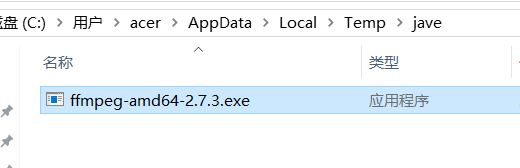
相關源碼:
Encoder encoder = new Encoder();
public Encoder() {

this.locator = new DefaultFFMPEGLocator();
}
// DefaultFFMPEGLocator
public DefaultFFMPEGLocator() {

// 獲取操作系統類型
String os = System.getProperty("os.name").toLowerCase();
boolean isWindows = os.contains("windows");
boolean isMac = os.contains("mac");
LOG.debug("Os name is <{}> isWindows: {} isMac: {}", new Object[]{
os, isWindows, isMac});
File dirFolder = new File(System.getProperty("java.io.tmpdir"), "jave/");
if (!dirFolder.exists()) {

LOG.debug("Creating jave temp folder to place executables in <{}>", dirFolder.getAbsolutePath());
dirFolder.mkdirs();
} else {

LOG.debug("Jave temp folder exists in <{}>", dirFolder.getAbsolutePath());
}
// 獲取文件的后綴
String suffix = isWindows ? ".exe" : (isMac ? "-osx" : "");
String arch = System.getProperty("os.arch");
// 獲取 ffmpeg 文件,
File ffmpegFile = new File(dirFolder, "ffmpeg-" + arch + "-" + "2.7.3" + suffix);
LOG.debug("Executable path: {}", ffmpegFile.getAbsolutePath());
if (ffmpegFile.exists()) {

LOG.debug("Executable exists in <{}>", ffmpegFile.getAbsolutePath());
} else {

LOG.debug("Need to copy executable to <{}>", ffmpegFile.getAbsolutePath());
this.copyFile("ffmpeg-" + arch + suffix, ffmpegFile);
}
if (!isWindows) {

try {

Runtime.getRuntime().exec(new String[]{
"/bin/chmod", "755", ffmpegFile.getAbsolutePath()});
} catch (IOException var9) {

LOG.error("Error setting executable via chmod", var9);
}
}
// 知道了文件的路徑
this.path = ffmpegFile.getAbsolutePath();
LOG.debug("ffmpeg executable found: {}", this.path);
}
private void copyFile(String path, File dest) {

// 拷貝文件代碼,具體略
}
Jave2 總結
Jave 雖然不在維護了,但是 它的“哥哥” Jave2 出現了,功能還是很強大的,基本上能滿足工作的一些對 音頻視頻 的操作了。
如果看了本文你也想玩一下這個工具,需要本文的演示代碼以及相關文件(想看高清無碼-小電影.mov)的話。可以關注公眾號,回復 Jave2 獲取。
如有其他問題,也歡迎留言,一起探討交流。
總結
以上是生活随笔為你收集整理的Jave2-Java音频视频编码器的全部內容,希望文章能夠幫你解決所遇到的問題。

- 上一篇: CRM_UI start port de
- 下一篇: hesse矩阵和jacobi矩阵_安索夫