
mediautil.jar java操作jpg信息,添加水印
生活随笔
收集整理的這篇文章主要介紹了
mediautil.jar java操作jpg信息,添加水印
小編覺得挺不錯的,現(xiàn)在分享給大家,幫大家做個參考.
廢話不多說,上代碼
package cn.com.system.util;import com.alibaba.fastjson2.JSON; import com.alibaba.fastjson2.JSONObject; import com.sun.image.codec.jpeg.JPEGCodec; import com.sun.image.codec.jpeg.JPEGEncodeParam; import com.sun.image.codec.jpeg.JPEGImageEncoder; import mediautil.gen.Rational; import mediautil.image.jpeg.Entry; import mediautil.image.jpeg.Exif; import mediautil.image.jpeg.IFD; import mediautil.image.jpeg.LLJTran;import javax.swing.*; import java.awt.*; import java.awt.font.TextAttribute; import java.awt.image.BufferedImage; import java.io.*; import java.text.AttributedCharacterIterator; import java.text.AttributedString; import java.time.LocalDate; import java.time.format.DateTimeFormatter;public class PhotoUtil {public static void addGPSExif(String path, String target, String GPS,String address) throws Exception {JSONObject json = JSON.parseObject(GPS);json.put("address",address);createMark(path,path,json,Color.yellow, 0.75F,"宋體",30);InputStream fip = new FileInputStream(path);LLJTran llj = new LLJTran(fip);llj.read(LLJTran.READ_INFO, true);//這里是重點,網(wǎng)上很多人出現(xiàn) mediautil.image.jpeg.JPEG cannot be cast to mediautil.image.jpeg.Exif 這個錯誤,原因是這張圖片沒有Exif頭,需要給他初始化一個if (!(llj.getImageInfo() instanceof Exif)) {llj.addAppx(LLJTran.dummyExifHeader, 0,LLJTran.dummyExifHeader.length, true);}Exif exif = (Exif) llj.getImageInfo();//獲取基礎(chǔ)標(biāo)簽IFD mainIfd = exif.getIFDs()[0];//設(shè)置相機(jī)制造商Entry e = new Entry(Exif.ASCII);e.setValue(0, "leica");mainIfd.addEntry(Exif.MAKE, e);//設(shè)置相機(jī)型號e = new Entry(Exif.ASCII);e.setValue(0, "leica");mainIfd.addEntry(Exif.MODEL, e);//設(shè)置描述e = new Entry(Exif.ASCII);e.setValue(0, "xxx");mainIfd.addEntry(Exif.IMAGEDESCRIPTION, e);//版權(quán)e = new Entry(Exif.ASCII);e.setValue(0, "xxx");mainIfd.addEntry(Exif.COPYRIGHT, e);//獲取私有標(biāo)簽IFD exifOffSetId = mainIfd.getIFD(Exif.EXIFOFFSET);if (exifOffSetId == null) {exifOffSetId = new IFD(Exif.EXIFOFFSET, Exif.LONG);mainIfd.addIFD(exifOffSetId);}exifOffSetId.setEntry(Exif.DATETIMEORIGINAL, 0, e);e = new Entry(Exif.RATIONAL);e.setValue(0, new Rational(1, 250));exifOffSetId.setEntry(Exif.EXPOSURETIME, 0, e);//修改圖片光圈值e = new Entry(Exif.RATIONAL);e.setValue(0, new Rational(16, 14));exifOffSetId.setEntry(Exif.APERTUREVALUE, 0, e);//修改圖片ISO速度e = new Entry(Exif.SHORT);e.setValue(0, 200);exifOffSetId.setEntry(Exif.ISOSPEEDRATINGS, 0, e);//修改圖片焦距e = new Entry(Exif.RATIONAL);e.setValue(0, new Rational(50, 1));exifOffSetId.setEntry(Exif.FOCALLENGTH, 0, e);//修改圖片35毫米焦距e = new Entry(Exif.SHORT);e.setValue(0, 50);exifOffSetId.setEntry(Exif.FOCALLENGTHIN35MMFILM, 0, e);//修改目標(biāo)距離e = new Entry(Exif.RATIONAL);e.setValue(0, new Rational(5, 10));exifOffSetId.setEntry(Exif.SUBJECTDISTANCE, 0, e);//修改圖片閃光能量值e = new Entry(Exif.RATIONAL);e.setValue(0, new Rational(7800, 1));exifOffSetId.setEntry(Exif.FLASHENERGY, 0, e);//修改圖片亮度e = new Entry(Exif.SHORT);e.setValue(0, 7);exifOffSetId.setEntry(Exif.BRIGHTNESSVALUE, 0, e);//修改圖片光源e = new Entry(Exif.SHORT);e.setValue(0, 0);exifOffSetId.setEntry(Exif.LIGHTSOURCE, 0, e);//修改圖片白平衡e = new Entry(Exif.SHORT);e.setValue(0, 0);exifOffSetId.setEntry(Exif.EXPOSUREMODE, 0, e);//修改圖曝光程序e = new Entry(Exif.SHORT);e.setValue(0, 2);exifOffSetId.setEntry(Exif.EXPOSUREPROGRAM, 0, e);//修改圖清晰度e = new Entry(Exif.SHORT);e.setValue(0, 2);exifOffSetId.setEntry(Exif.SHARPNESS, 0, e);//修改圖像飽和度e = new Entry(Exif.SHORT);e.setValue(0, 0);exifOffSetId.setEntry(Exif.SATURATION, 0, e);//修改圖像對比度e = new Entry(Exif.SHORT);e.setValue(0, 0);exifOffSetId.setEntry(Exif.CONTRAST, 0, e);//修改圖像Exif版本e = new Entry(Exif.ASCII);e.setValue(0, "0230");exifOffSetId.setEntry(Exif.EXIFVERSION, 0, e);//獲取GPS標(biāo)簽IFD gpsIfd = mainIfd.getIFD(Exif.GPSINFO);if (gpsIfd == null) {System.out.println("Gps IFD not found adding..");gpsIfd = new IFD(Exif.GPSINFO, Exif.LONG);mainIfd.addIFD(gpsIfd);}//修改圖片GPS信息int[] longitudes = degressToString(Double.parseDouble(json.getString("longitude")));int[] latitudes = degressToString(Double.parseDouble(json.getString("latitude")));e = new Entry(Exif.ASCII);e.setValue(0, 'N');gpsIfd.setEntry(new Integer(Exif.GPSLatitudeRef), 0, e);e = new Entry(Exif.RATIONAL);e.setValue(0, new Rational(latitudes[0], 1));e.setValue(1, new Rational(latitudes[1],1));e.setValue(2, new Rational(latitudes[2], 10000));gpsIfd.setEntry(new Integer(Exif.GPSLatitude), 0, e);e = new Entry(Exif.ASCII);e.setValue(0, 'E');gpsIfd.setEntry(new Integer(Exif.GPSLongitudeRef), 0, e);e = new Entry(Exif.RATIONAL);e.setValue(0, new Rational(longitudes[0], 1));e.setValue(1, new Rational(longitudes[1],1));e.setValue(2, new Rational(longitudes[2], 10000));gpsIfd.setEntry(new Integer(Exif.GPSLongitude), 0, e);llj.refreshAppx(); // Recreate Marker Data for changes done// 改寫后的文件String fileName = target;OutputStream out = new BufferedOutputStream(new FileOutputStream(fileName));llj.xferInfo(null, out, LLJTran.REPLACE, LLJTran.REPLACE);fip.close();out.close();llj.freeMemory();}/*** @param filePath 讀取的文件地址* @param filePath1 添加水印后地址* @param markContent 經(jīng)緯度 地址* @param markContentColor 顏色* @param qualNum 高質(zhì)量圖片* @param fontType 字體* @param fontSize 字體大小* @return*/public static boolean createMark(String filePath, String filePath1,JSONObject markContent, Color markContentColor, float qualNum,String fontType, int fontSize) {ImageIcon imgIcon = new ImageIcon(filePath);Image theImg = imgIcon.getImage();// Image可以獲得 輸入圖片的信息int width = theImg.getWidth(null);int height = theImg.getHeight(null);Object pro = theImg.getProperty("", null);System.out.println(pro);// 800 800 為畫出圖片的大小BufferedImage bimage = new BufferedImage(width, height,BufferedImage.TYPE_INT_RGB);// 2d 畫筆Graphics2D g = bimage.createGraphics();g.setColor(markContentColor);g.setBackground(Color.white);// 畫出圖片-----------------------------------g.drawImage(theImg, 0, 0, null);// 畫出圖片-----------------------------------// --------對要顯示的文字進(jìn)行處理--------------String address = markContent.getString("address");//地址AttributedString ats = new AttributedString(address);Font f = new Font(fontType, Font.PLAIN, fontSize);ats.addAttribute(TextAttribute.FONT, f, 0, address.length());//時間String date = LocalDate.now().format(DateTimeFormatter.ofPattern("yyyy.MM.dd"));AttributedString sj = new AttributedString(date);sj.addAttribute(TextAttribute.FONT, f, 0, date.length());//經(jīng)緯度String longitudes = latLng2Dfm(Double.parseDouble(markContent.getString("longitude"))); //東經(jīng)String latitudes = latLng2Dfm(Double.parseDouble(markContent.getString("latitude"))); //北緯String bwn ="北緯";AttributedString bw = new AttributedString(bwn);bw.addAttribute(TextAttribute.FONT, f, 0, bwn.length());AttributedString bwjd = new AttributedString(latitudes);bwjd.addAttribute(TextAttribute.FONT, f, 0, latitudes.length());String djs ="東經(jīng)";AttributedString dj = new AttributedString("東經(jīng)");dj.addAttribute(TextAttribute.FONT, f, 0, djs.length());AttributedString djjd = new AttributedString(longitudes);djjd.addAttribute(TextAttribute.FONT, f, 0, longitudes.length());AttributedCharacterIterator iter = ats.getIterator();// ----------------------g.drawString(iter, 50, height - 150);g.drawString(sj.getIterator(), 50, height - 200);g.drawString(bw.getIterator(), 50, 50);g.drawString(bwjd.getIterator(), 50, 90);g.drawString(dj.getIterator(), 50, 130);g.drawString(djjd.getIterator(), 50, 170);// 添加水印的文字和設(shè)置水印文字出現(xiàn)的內(nèi)容 ----位置g.dispose();// 畫筆結(jié)束try {// 輸出 文件 到指定的路徑FileOutputStream out = new FileOutputStream(filePath1);//jdk1.6后刪除了rt.jar ,jce.jar //用 ImageIO.write(bimage, "jpg", out); 代替// JPEGImageEncoder encoder = JPEGCodec.createJPEGEncoder(out);// JPEGEncodeParam param = encoder.getDefaultJPEGEncodeParam(bimage);// param.setDensityUnit(JPEGEncodeParam.DENSITY_UNIT_DOTS_INCH);// param.setXDensity(150);// param.setYDensity(150);// param.setQuality(qualNum, true);// encoder.encode(bimage, param);//ImageIO.write()會改變圖片大小// ImageIO.write(bimage, "jpg", out);// 所以經(jīng)過以下處理,可以調(diào)整相應(yīng)的參數(shù),甚至可以生成大于原圖的圖片Iterator<ImageWriter> writerIterator = ImageIO.getImageWritersByFormatName("jpg");if (writerIterator.hasNext()) {ImageWriter writer = writerIterator.next();ImageWriteParam param = writer.getDefaultWriteParam();param.setCompressionMode(ImageWriteParam.MODE_EXPLICIT);// 該參數(shù)在0.92~0.93左右是最接近原圖大小的,最大是1param.setCompressionQuality(1f);writer.setOutput(ImageIO.createImageOutputStream(out));// writer.write(bi);writer.write(null, new IIOImage(bimage, null, null), param);out.close();writer.dispose();}} catch (Exception e) {return false;}return true;}/*** 將gps的經(jīng)緯度變成度分秒*/public static int[] degressToString(double digitalDegree) {double num = 60;int degree = (int) digitalDegree;double tmp = (digitalDegree - degree) * num;int minute = (int) tmp;int second = (int) (10000 * (tmp - minute) * num);int[] ints = {degree, minute, second};return ints;}/*** 將經(jīng)緯度轉(zhuǎn)換為度分秒格式** @param du 116.41884740.0897315* @return 116°25'7.85" 40°5'23.03"*/public static String latLng2Dfm(double du) {int du1 = (int) du;double tp = (du - du1) * 60;int fen = (int) tp;String miao = String.format("%.2f", Math.abs(((tp - fen) * 60)));return du1 + "°" + Math.abs(fen) + "'" + miao + "\"";} }這樣會有一個問題,添加水印后回吧照片的基本信息清除,導(dǎo)致mediautil獲取不到拍攝日期,不知道是不是給了一個默認(rèn)值 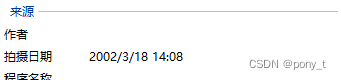 解決方法,提前獲取到時間,再加水印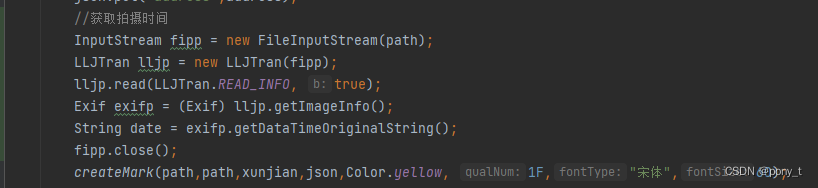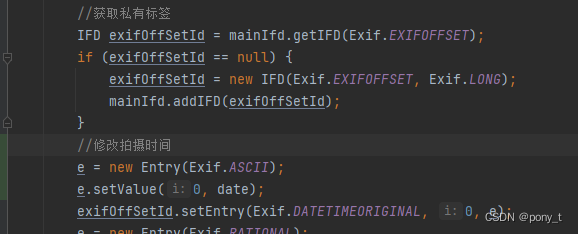MediaUtiljar包地址
總結(jié)
以上是生活随笔為你收集整理的mediautil.jar java操作jpg信息,添加水印的全部內(nèi)容,希望文章能夠幫你解決所遇到的問題。

- 上一篇: 大二了 突破自己,努力,加油
- 下一篇: 历届图灵奖 (Turing award)